One system from the counter to the carrier.
The register, the back office and the ecommerce back end — engineered for liquor stores and convenience stores. We supply the hardware, load your item file and configure every lane. You ring, receive, count, sell online and ship from one place.
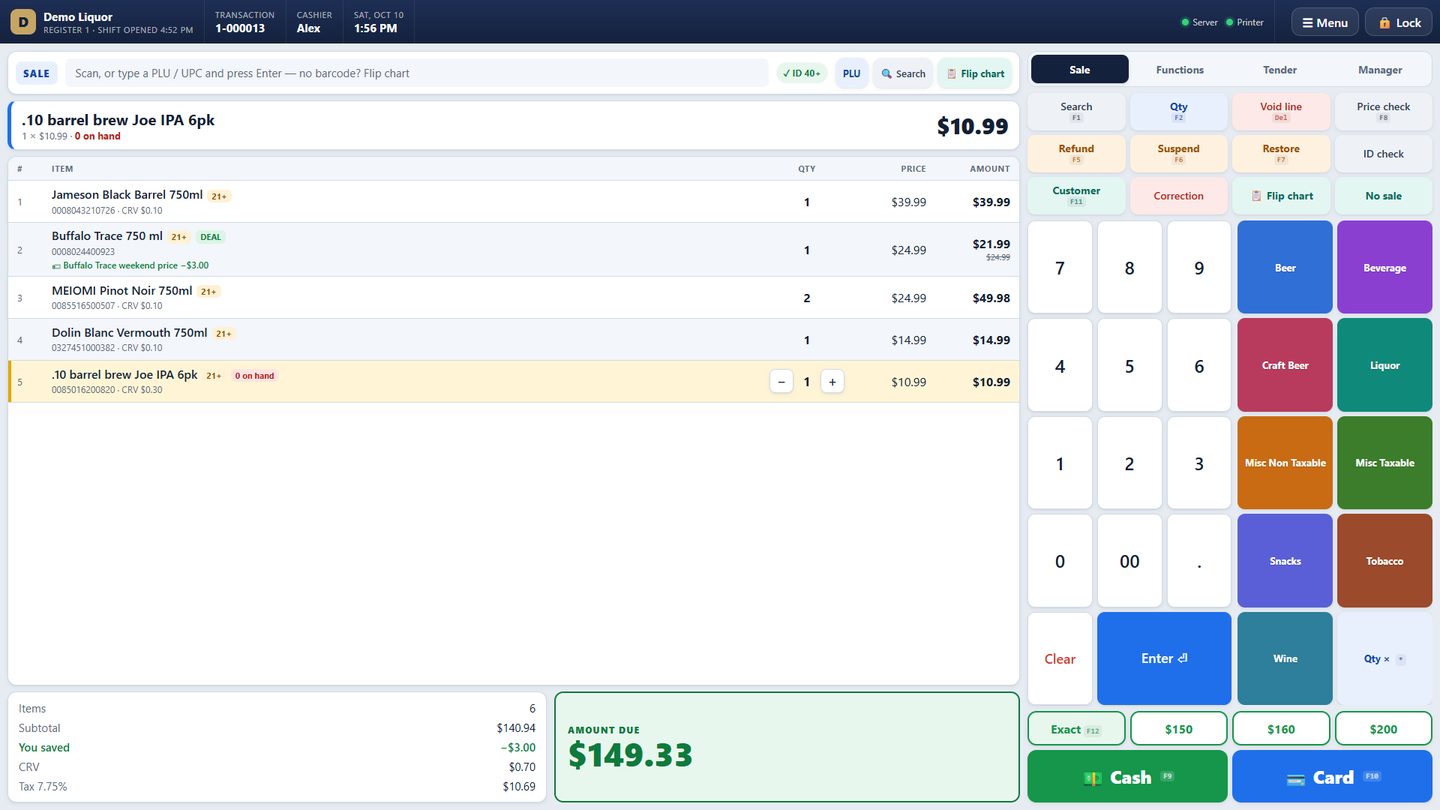
Register. Back office. Ecommerce back end. One catalog.
Every lane runs on its own PC in the store, so the counter never depends on the internet. The store's back office runs beside it. AmoraOS — the cloud side — takes the online orders, fulfillment, shipping and reconciliation.
We supply the hardware. It arrives configured.
Every station ships with Amora POS installed, your item file loaded and your lanes, printers and displays already set up. Plug in, sign in, sell. Want to reuse a PC you already own? That works too.
Register station
Touchscreen Windows PC at each lane, with the register in full screen and a PIN per cashier.
Customer display
Second screen facing the customer: every item, the savings, CRV and the total — and your deals on rotation between sales.
Barcode scanner
Hands-free or handheld scanning of UPCs and the barcode on the back of a driver's license for the 21+ check.
Receipt printer & cash drawer
Thermal receipts with a receipt barcode for returns; the drawer kicks on cash, no-sale and paid out — every opening logged.
Handheld scanner
Android handheld (Zebra-class) on the store Wi-Fi for counts, receiving checks, price lookup and shelf labels — no clipboard.
Card terminal
Keep the terminal and processor you have today. Integrated Fiserv / First Data processing with your own merchant account is next.
Amora POS runs on any Windows 10 / 11 PC with a scanner and receipt printer. Bring what you have and we configure it; replace pieces only when you want to.
Perfected for liquor. Ready for the c-store.
Bottles, cases, CRV, 21+
Case deals, mix & match, bottle deposits per item, ID checks with the cutoff date computed for today, lotto and cash back kept apart from sales.
Fast lanes, many departments
Flip chart for singles, ice and fountain drinks; coupons, bill pay, money orders and lottery as their own keys; hourly sales by department.
Store plus web store
Sell on Shopify and marketplaces from the same catalog, with pick, pack, ship and reconciliation handled by AmoraOS.
Separate stores, one owner
Each store keeps its own inventory and reports; transfers travel between stores through Amora with a barcode slip for the bottles.
Checkout that keeps the line moving.
Scan and go. Deals apply themselves, CRV lands on its own line, and the keys a cashier reaches for are big, color-coded and one tap away.
- Scan and go. Mix & match, case deals, BOGO and sale prices apply on their own — the cashier does nothing.
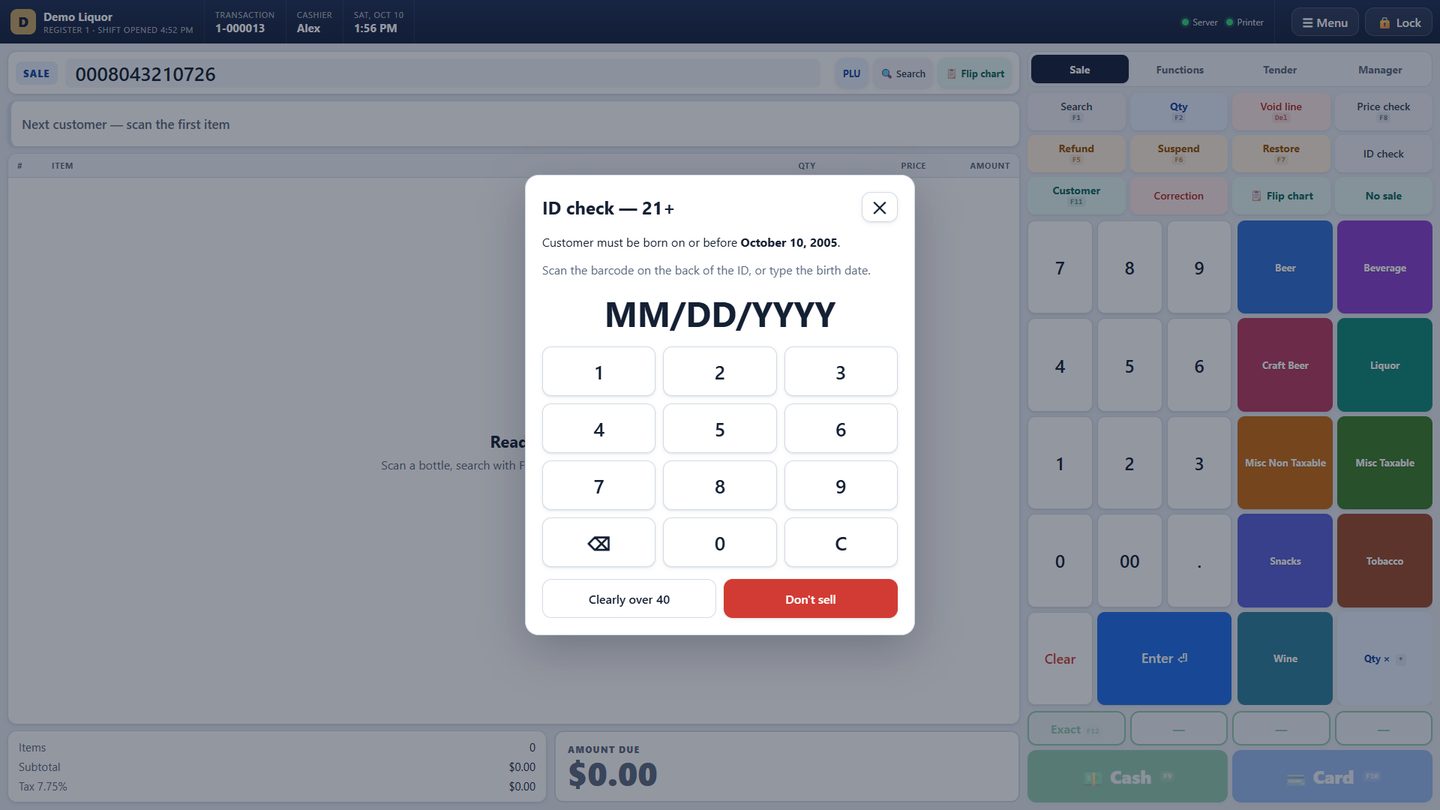
- 21+ check on every age-restricted item. Scan the license or key the birth date; the cutoff date is computed for today.
- CRV bottle deposits per item — 5¢, 10¢, six-packs, cases — never taxed, always on its own receipt line.
- Big touch keys plus F-keys, quick-cash buttons for the next bills up, exact, hold and recall.
- Manager approval for voids, refunds, discounts, overrides and no-sale, with the approver's name on the record.
- EBT SNAP pays eligible food only, with the sales tax taken off the EBT-paid part; eligibility comes over from your item file.
- Money orders, transfers and bill pay are collected, never counted as sales; lotto payouts, coupons and cash-back handled as what they are.
- House accounts, loyalty points, email and text receipts.
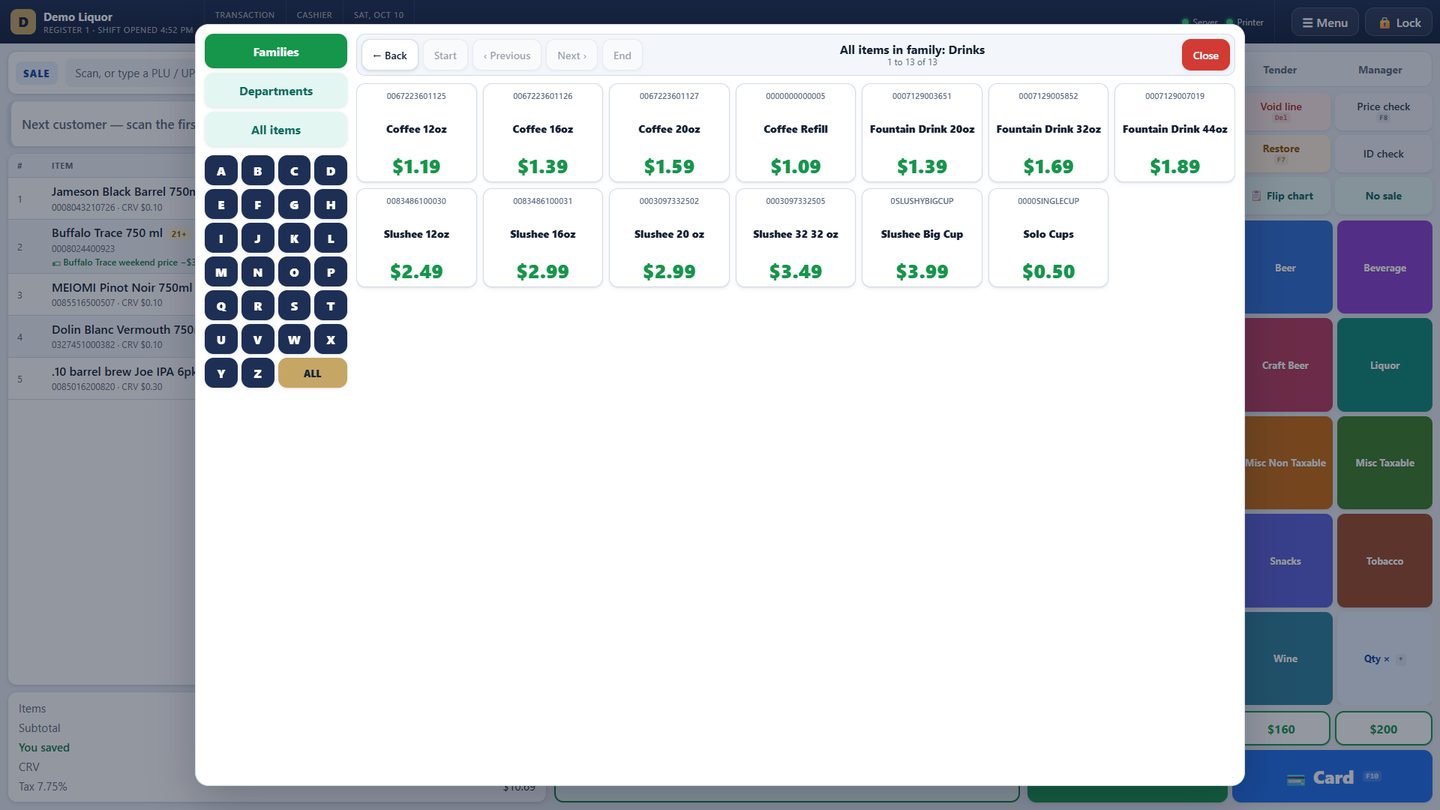
Find anything, even without a barcode.
- Flip chart for ice, singles, cups and fountain drinks, grouped the way the store already groups them.
- Browse by family, department or A–Z with big prices; search by name, PLU or UPC from any screen.
- Customer display mirrors the sale and rotates your deals between customers.
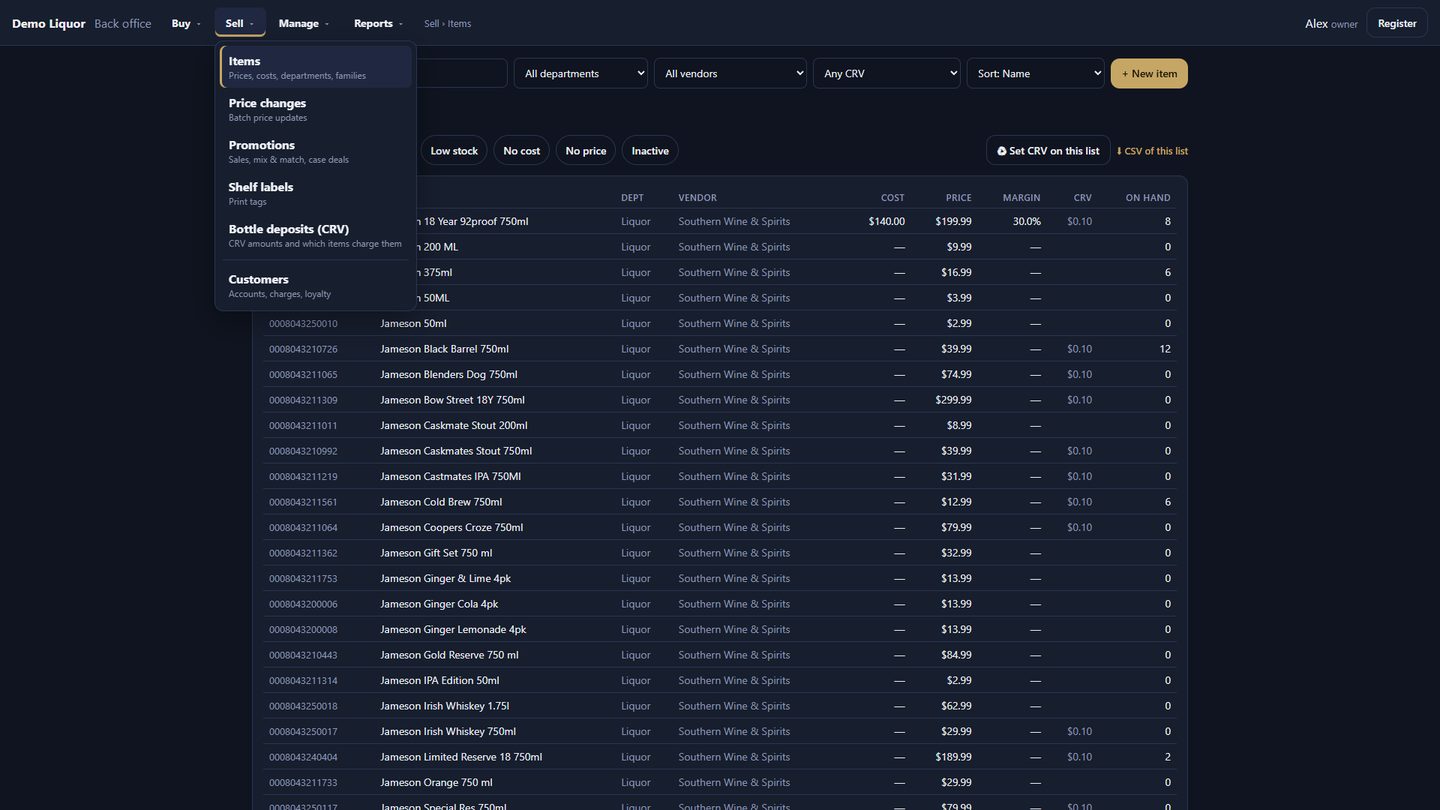
Laid out the way you run the store.
Four menus — Buy, Sell, Manage, Reports — on the register, the office PC or a tablet on the store Wi-Fi. Every stock movement is a document: cashiers draft, managers post, nothing changes stock silently.
- Buy — purchase orders, receiving, DSD deliveries, reorder lists, vendors.
- Sell — items, price changes, promotions, shelf labels, CRV, customers.
- Manage — operators and PINs, counts, stock value, transfers, backups, licensing, updates.
- Reports — printable and exportable, from end of day to item movement.
| Module | What it does | Detail |
|---|---|---|
| BUY / RECEIVE | Receiving from invoices | Scan bottles or cases, or drop in the distributor's PDF — Southern Glazer's, Breakthru, Crest/Reyes and Park Street are read line by line, matched by the vendor's item number and UPC, and remembered. Delivery fees spread into cost; CRV kept apart; cost changes flag the item and suggest a retail at your target margin. |
| BUY / ORDER | Purchase orders & reorder | Reorder lists in whole cases from reorder points and days of supply; POs by vendor; receive against the PO. |
| MANAGE / COUNT | Inventory counts | Count by department or family on the handheld, blind if you want; a readable variance; "not found" zeroed on request. |
| MANAGE / MOVE | Documents & transfers | DSD, returns to vendor, credits, breakage and store-to-store transfers, each with a paper trail and a manager's name on the post. |
| SELL / PRICE | Prices & promotions | Bulk price changes by %, amount or margin with .99/.49 rounding; sale prices, mix & match, N-for, BOGO and case deals by department, vendor or item, with dates and weekdays. |
| SELL / TENDERS | EBT, dual pricing, money services | EBT SNAP for eligible food with the tax exemption done right; optional dual pricing (cash price on the shelf, card price + your percent, set by an owner or manager); money orders, transfers and bill pay kept out of sales. |
| SELL / CUSTOMER | Accounts & loyalty | House accounts with limits, statements and aging; points earned and redeemed at the register. |
| MANAGE / STAFF | Operators & training | A PIN per person with cashier, manager and owner roles; exceptions by cashier; training mode that rings with the real rules and saves nothing. |
| MANAGE / SYSTEM | Backups, updates, licensing | Nightly backups with a copy off the PC; signed updates installed overnight with automatic rollback; licensed per store by register. |
The best back end for stores that sell online.
AmoraOS is the cloud side of the same company: it already runs the online orders, fulfillment and reconciliation for licensed retailers shipping across 42 states + D.C. Connect your web store and it becomes your shipping desk and your books' best friend.
Shopify and marketplace orders, in one queue
Orders flow in from your web store and marketplaces, with saved filters, late-order tracking and team notes.
Scan-verified packing
Every item is barcode-checked before a label prints; multi-box orders, packing slips with prices, pre-order guards.
Labels, rates and tracking
Compare carriers and buy labels from the pack station; tracking flows back to the order and the customer; courier delivery for local orders.
Returns and support in the same place
A scan station for returns (sellable, damaged, opened), and help-desk tickets shown right on the order.
Accounting-ready reconciliation
Payouts, commissions and shipping costs matched against carrier invoices and channel statements; sales-tax-by-state and per-order exports for your accountant.
Purchasing and distributor catalogs
Purchase orders grouped by vendor and brand, distributor catalogs with cost history, inventory recap emails every morning.
The register's items, prices and on-hand are the source of truth; AmoraOS feeds your online channels from it and sends web orders back for picking. Ask us where your store is on this road in the demo.
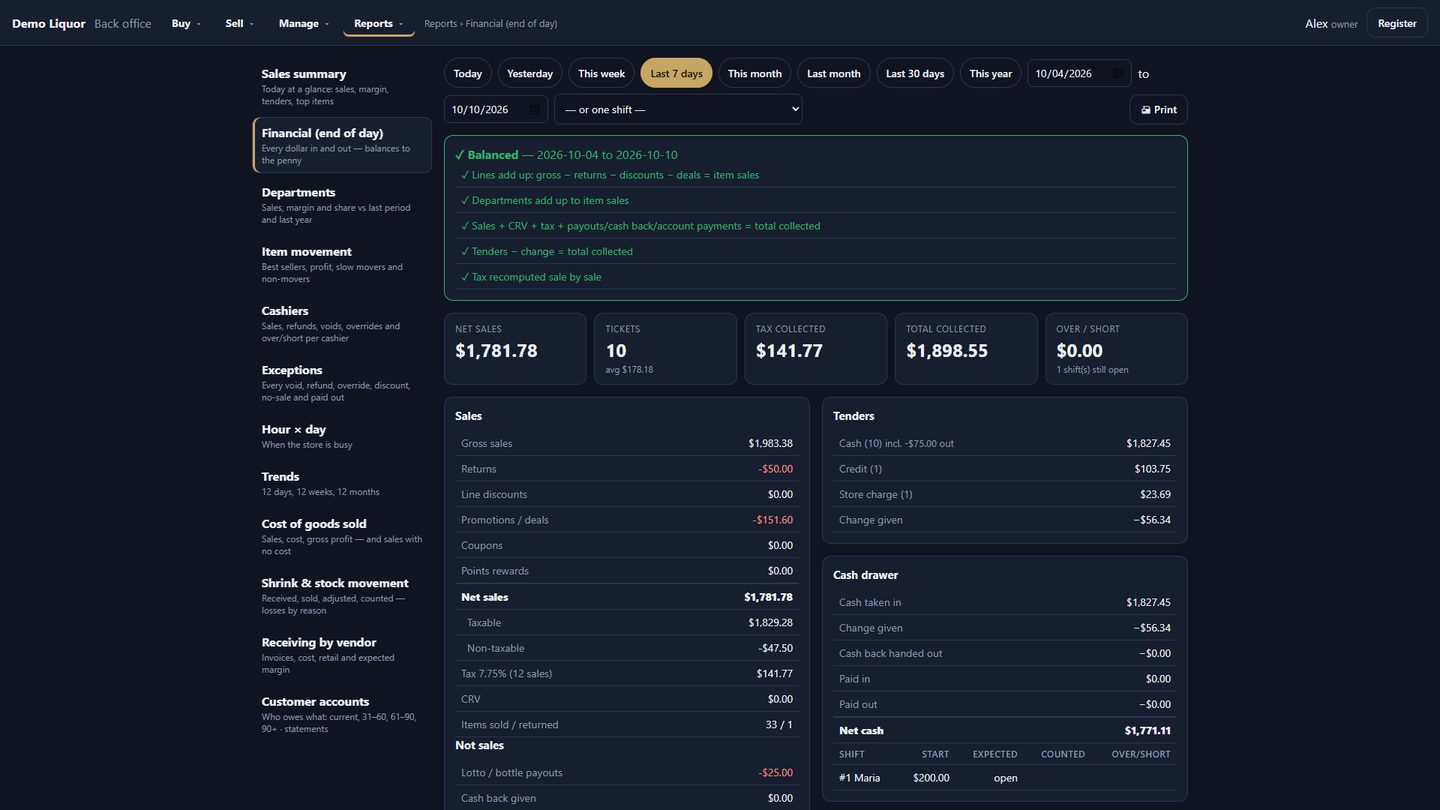
Numbers that prove themselves.
Every total is computed two different ways and compared. If anything doesn't tie out, the report says exactly where and by how much — before you find it at month end.
- End of day checks itself five ways and balances to the penny — tenders, tax, CRV, drawer, over/short.
- Departments vs last period and the same days last year; hour × weekday heat grid.
- Item movement, cashiers, exceptions, cost of goods, shrink, receiving by vendor, customer aging and statements.
- A daily summary emailed to you each morning; every report prints and exports to CSV.
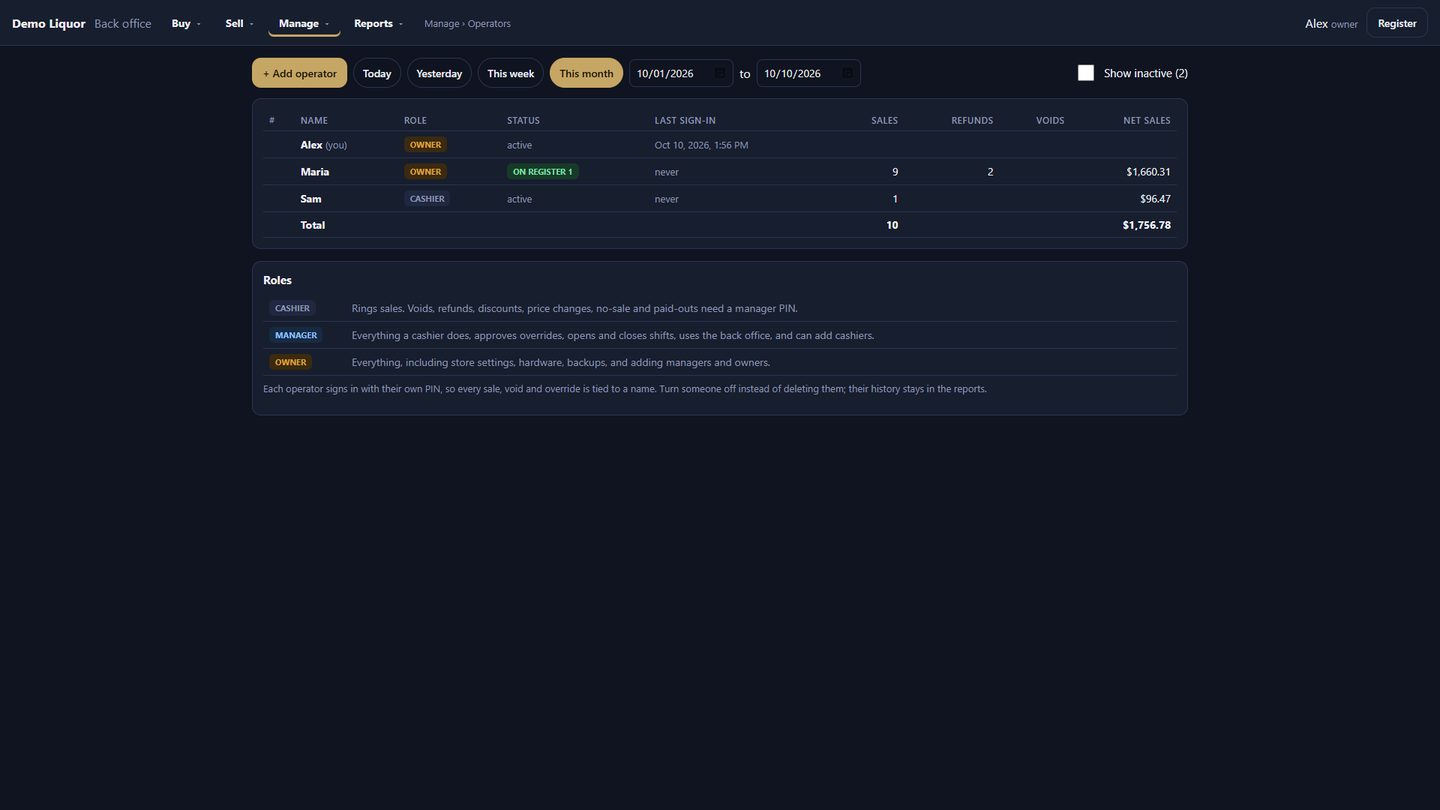
Every sale and override has a name on it.
- Exceptions report lists every void, refund, discount and override — and who approved it.
- Over/short by cashier and shift; drawer openings logged.
- When someone leaves, turn their PIN off; their history stays in the reports.
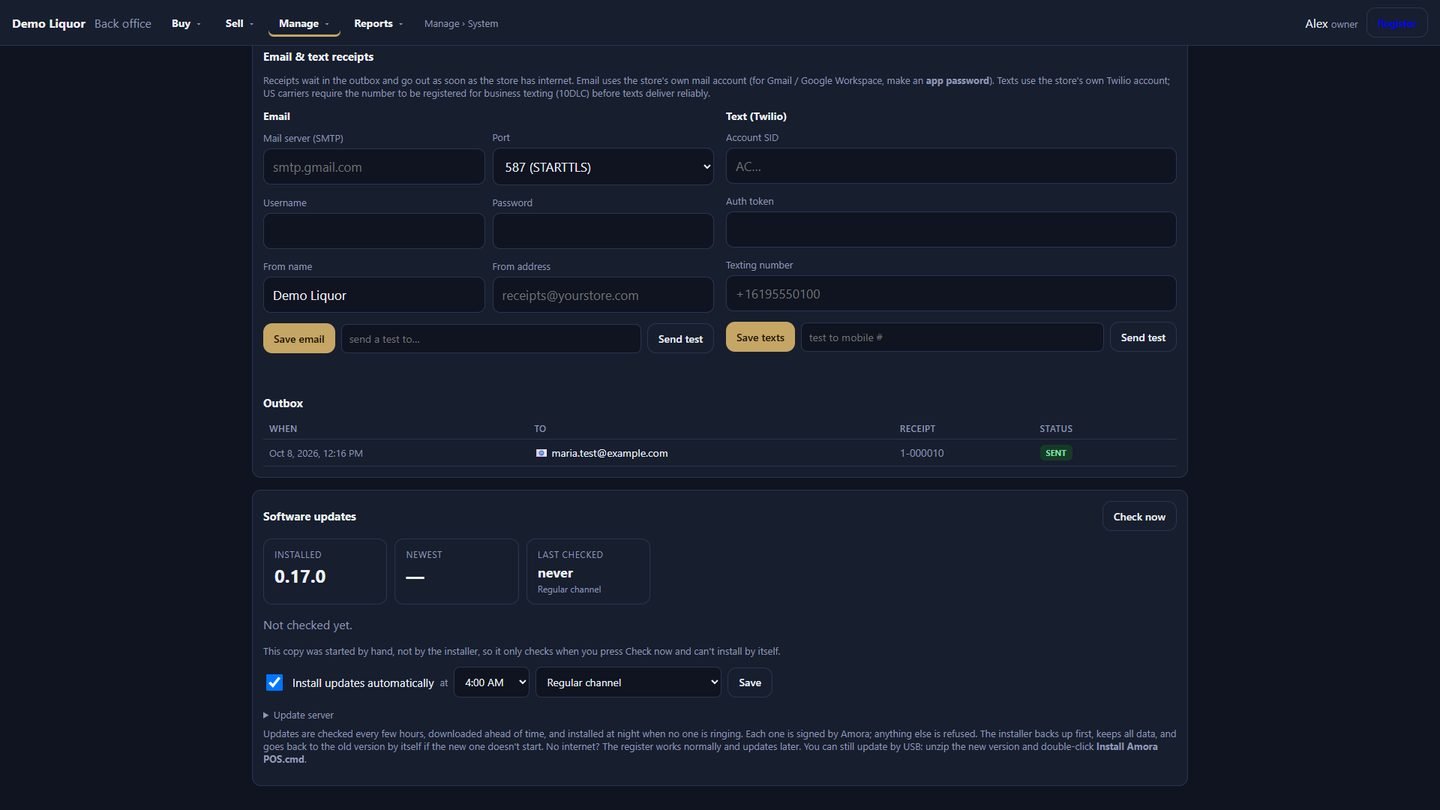
Runs in your store. Updates itself.
- Internet down? Keep selling. Everything runs on the register itself; no cloud outage can stop the counter.
- Backups every night and at every shift close, with a second copy off the PC.
- Updates arrive signed and install overnight when nobody is ringing; if one won't start, the register rolls back on its own.
- Licensed per store, by register — add a lane when you need one.
Keep your card machine
Ring the sale on Amora, run the card on the terminal you already have.
Integrated Fiserv / First Data
The register sends the amount to the terminal, using your own merchant account.
No processing lock-in
You choose who processes your cards and keep your own rates.
Moving over is a day, not a project.
Send us your item file
Items, prices, departments, vendors, costs and CRV come over from your current system — directly from LOC, or from an export file from any other POS. New stores can start empty.
Hardware arrives configured
Stations ship with the software installed and your items loaded; or we set up the PCs you already own.
Practice
Training mode lets cashiers ring anything with the real rules; nothing is saved.
Run side by side, then switch
Compare with your current register for as long as you like, then switch when you're ready.
Built inside working liquor stores, by a liquor store owner — and still running one every day.
Not a general retail system adapted later. Every screen was shaped on real shifts: Friday-night lines, ID checks, CRV, case deals, lotto payouts, month-end counts and thousands of online orders shipped.
Straight answers.
Do you supply the hardware?+
Yes. Register stations, customer displays, scanners, receipt printers, cash drawers and handhelds arrive with Amora POS installed and your item file loaded. If you already own Windows PCs, scanners or printers, we configure those instead and you replace pieces only when you want to.
Does it work when the internet is down?+
Yes. The register, the item file and the back office run on the PC in your store. Sales, deals, ID checks and receipts keep working; the internet is only needed for updates, email, online orders and talking to your other stores.
Can I keep my card processor?+
Yes. Today you ring the sale on Amora and run the card on the terminal you already have. Integrated Fiserv / First Data processing is coming next and will use your own merchant account — nobody is moved to a processor to use the POS.
How do my items get in?+
From LOC we read items, prices, departments, vendors, costs, families and CRV directly. From any other system, send the export file — UPC, name and price are enough to start, and costs, departments and on-hand come along when the file has them.
How does receiving work?+
Scan bottles or cases against an invoice, or drop in the distributor's PDF: Southern Glazer's, Breakthru, Crest/Reyes and Park Street invoices are read line by line, matched to your items by the vendor's item number and UPC, and remembered for next time. A manager posts the document; stock and cost update together.
What does the ecommerce side actually do?+
AmoraOS takes orders from your web store and marketplaces, packs them with barcode verification, buys labels and tracks shipments, handles returns and support tickets, and reconciles payouts, commissions and shipping costs so your accountant gets clean numbers. It's the same platform that fulfills orders for spirits brands across 42 states + D.C.
I have more than one store.+
Each store keeps its own inventory, staff and reports. Transfers between your stores travel through Amora — the sending store posts a transfer, the receiving store scans what arrived — and a barcode slip rides with the bottles.
How is it licensed?+
Per store, by the number of registers. Each register activates with the store's key and checks in on its own; we'll walk through the options for your store in the demo.
What happens in the demo?+
We load your own item file and ring your bottles, deals and CRV live, then walk through receiving, counts, the end-of-day report and — if you sell online — the order-to-shipment flow. Bring the questions your current register never answered.
See it on your counter.
Tell us about your store and we'll reach out to book a live demo — on your own item file, with your own bottles, deals and CRV.
Request received.
Thanks — we'll reach out shortly to set up your demo. If it's urgent, email hello@amoraos.com.